Cameo - Personal celeb videos
- 4.8
- Rating
- 1.00M
- Installs
- Free
- Price

 Analysis by App-foxy
I approached Cameo - Personal celeb videos as a first-time shopper rather than as someone already familiar with celebrity shoutouts. The basic idea is easy to understand: you browse personalities, choose someone for a personal video, and use the result for a celebration, joke, encouragement, or simple surprise. What matters in practice is how clearly the app helps you move from browsing to a request that has a real chance of feeling personal.
This is a free shopping app from Cameo - Personalized Shoutouts, rated Teen. It has built a sizeable audience, with more than a million installs, an average rating of 4.8 from roughly twenty thousand ratings, and about 3.9 thousand written reviews. Those figures suggest that the concept works for many people, although they should not be mistaken for a guarantee that every request will feel equally memorable.
What to expect before you make a request
The most useful way to think about Cameo is not as a normal video-streaming service and not as a general celebrity social network. It is a marketplace for personalized appearances. You are shopping for a particular kind of message from a particular person, so the quality of the experience depends on the match between your expectations, the recipient, and the instructions you provide.
You May Also Like

 Pandora - Music & Podcasts
Pandora’s Music Is Easy to Start, but Harder to Recover
Pandora’s strength is its low-effort path from a seed to a station. Its weak spot is how much confidence it asks you to place in connection, setup, and quiet recovery.

 AccuWeather: Weather Radar
AccuWeather Review: A Quick, Clear Forecast for Everyday Decisions
For everyday plans, the best forecast is the one you can understand quickly. AccuWeather makes rain timing, radar, and local conditions easy to act on, with a few trade-offs.

 Hill Climb Racing
Why Hill Climb Racing Still Turns Crashes Into One More Run
A tiny car, a bumpy hill and one more upgrade: Hill Climb Racing keeps resurfacing because its simple chaos makes every near-miss feel personal.

 AliExpress - Shopping App
AliExpress Makes Global Shopping Feel Personal, but Shoppers Bear the Risk
AliExpress turns a global marketplace into a pocket-sized discovery engine. Its reach is useful, its shopping loop compelling, and its trade-offs easy to miss.

 Lords Mobile: Kingdom Wars
Lords Mobile Is a Kingdom-Building Routine, Not a Quick Match
A case-by-case verdict on the building, battles, device demands, and social commitments that make Lords Mobile rewarding for some players and exhausting for others.

 PDF Scanner app - TapScanner
TapScanner Makes Paperwork Easier to Capture, Check, and Share
TapScanner makes scanning with a phone feel less like a rescue operation and more like a dependable step in getting work done. Its capture tools are useful, though not flawless.
More From Our News Desk
View All News


That distinction is important. If you want a polished, professionally scripted advertisement, a standard recorded clip may be a better fit. If you want a personal greeting that acknowledges a birthday, inside joke, team, milestone, or encouragement, this app is aimed much more directly at that occasion. I found the strongest use case to be a gift where the recipient already has a genuine connection to the chosen personality.
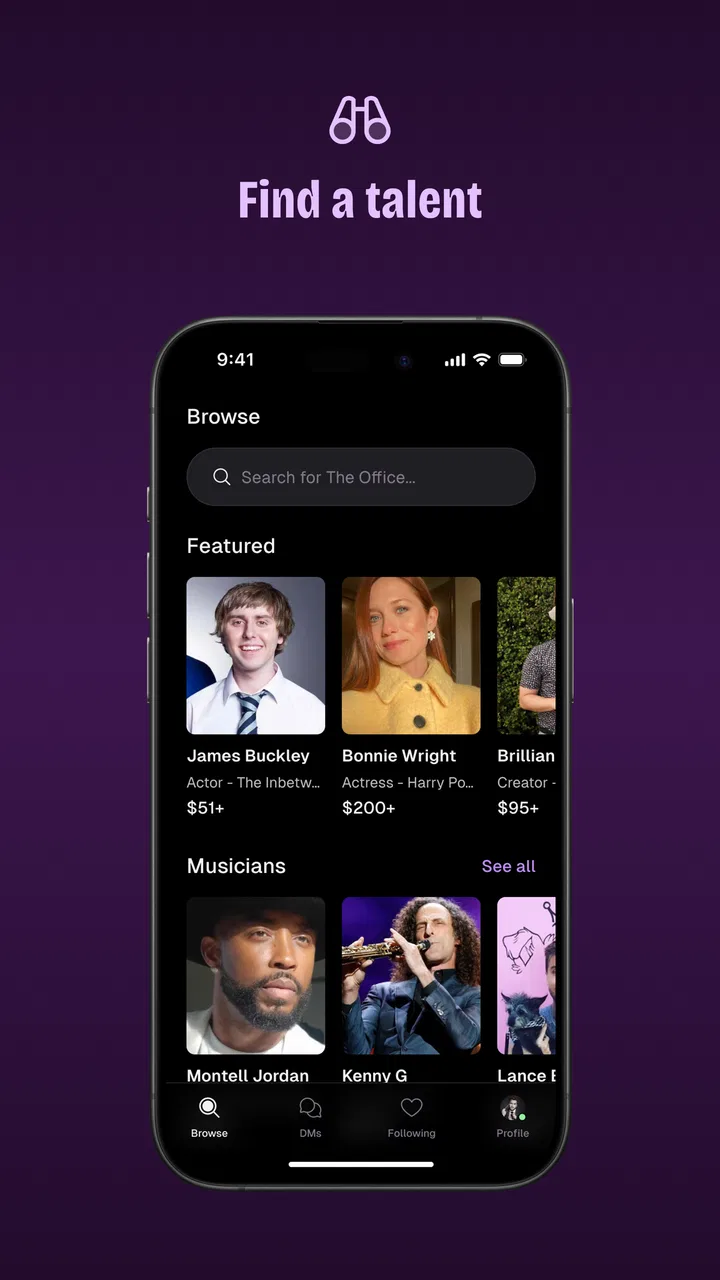
Browsing is part of the entertainment, but I would not treat it as the whole point. It is easy to get distracted by familiar names and choose someone simply because they are recognizable. A better approach is to start with the recipient: what do they watch, listen to, follow, or quote? A less obvious choice who fits the person well can create a warmer surprise than the biggest name available.
The app is free to install, but the actual personalized request is not automatically free. In-app purchases range from forty-nine cents to nearly ten thousand dollars per item, so the possible cost varies dramatically. I would decide on a spending limit before browsing deeply. That prevents the excitement of finding a favorite personality from turning into an impulsive purchase.
The Teen content rating is another reason to think about the recipient and the wording of the request. A message intended for a younger family member should be written with the same care you would use when ordering any entertainment for them. The rating does not make every personality or every message suitable for every occasion.
Choosing the right person is more important than choosing the biggest name
My first practical tip is to shortlist several candidates before committing. Look at the style of the personality rather than only the fame attached to the name. Someone known for comedy may suit a playful birthday message, while someone associated with motivation or sports may be better for encouragement. The right tone often matters more than status.
I would also think about how much context the recipient will need. If the person being surprised immediately recognizes the celebrity, the video can get to the emotional moment quickly. If recognition is uncertain, the gift may need a clearer introduction or a stronger connection to the recipient’s interests. That is not a flaw in the app; it is a reminder that personalized media still depends on a thoughtful choice.
Another useful trade-off is specificity. A request with no guidance may leave the personality too much room to produce a generic greeting. A request overloaded with instructions can sound stiff. I recommend giving the occasion, the recipient’s name, one or two personal details, and the desired mood. That is usually enough direction without trying to write the entire performance yourself.
Getting set up without overthinking it
After installing the app, I would begin by treating the first session as research rather than immediately placing an order. Explore the available personalities and observe how the app presents the shopping experience. The goal is to learn what kind of information you need before you spend money: the recipient’s name, the occasion, the pronunciation of unusual names, and the tone you want.
The current version is 254.0.0, and the app supports devices running Android 8.1 or later. That makes compatibility worth checking before you plan a time-sensitive surprise. A technically supported phone can still be inconvenient if it has limited storage, an unreliable connection, or an outdated account setup, so I would avoid leaving the entire process until the last evening before the event.
When creating a request, prepare the details in a note first. This is one of the simplest ways to improve the final result. Write the recipient’s name exactly as you want it spoken, add phonetic help if necessary, and explain the relationship in plain language. For example, “This is for my sister who has followed your work for years” gives useful emotional context without demanding a particular script.
Keep private information out of the request unless it is genuinely needed. A personalized greeting rarely requires a home address, account credentials, medical details, or other sensitive material. The most effective prompts are usually short and human. They tell the personality why the message matters, not everything about the recipient’s life.
I also recommend checking the final wording slowly before submitting. Names, dates, pronouns, and event details are easy to mistype when you are excited. A small error can make a celebratory message awkward, especially when the recipient watches it with other people. Reading the request aloud is a surprisingly good editing test.
The first successful action: make one request with a clear purpose
For a first meaningful success, I would choose a modest occasion with a clear emotional goal rather than trying to create a complicated production. A birthday, congratulations message, lighthearted apology, or encouragement before an important day gives the personality a straightforward direction. The recipient should be able to understand why the video was made within the first few seconds.
Imagine that a friend is celebrating a birthday and has a long-running attachment to a particular comedian. Instead of writing “Say happy birthday,” I would explain the friend’s name, the birthday, the reason that comedian matters to them, and one harmless shared reference. I would ask for a warm and playful tone. That gives the creator enough material to personalize the greeting while leaving room for their own style.
Once the request is placed, patience becomes part of the experience. Do not build a surprise around an exact minute unless you have enough flexibility. A personalized video is different from downloading a ready-made clip: the appeal comes from the individual response, but that also means the process may not feel as immediate as ordinary shopping. For a birthday, I would plan ahead and keep a backup gift idea available.
When the video arrives, watch it privately before sending it to the recipient. This is not only about checking whether the name and occasion are correct. It lets you judge the tone, length, and suitability for the audience. A message that is perfect for a close adult friend may not be right for a family group or a workplace celebration.
For delivery, timing matters almost as much as the content. Sending the video a few hours before a party can work well because the recipient has time to enjoy it without the event becoming rushed. For a group celebration, decide in advance whether you will play it for everyone or send it privately. The same video can feel intimate in a direct message and performative when shown to a room.
Where first-time users can become confused
The most common misunderstanding is assuming that every familiar personality will provide the same type of experience. This is a marketplace with individual creators, not one uniform studio. Communication style, availability, humor, and attention to detail can differ. I would judge each profile on its own rather than treating the app’s overall reputation as a promise about one particular request.
Cost can also be confusing because the app itself is free while personalized content may involve an in-app purchase. The broad purchase range makes it especially important to inspect the amount associated with the person you are considering before you get emotionally committed to the idea. A free download is not the same thing as a free greeting.
Another point of friction is the difference between a personal message and a custom script. You can provide useful guidance, but the personality may interpret it in their own way. If you need exact wording, exact timing, or a carefully controlled presentation, this format may disappoint you. The trade-off is that leaving room for interpretation can make the result feel more natural.
There is also a social risk that is easy to overlook. A celebrity greeting is not automatically meaningful just because it comes from a recognizable person. If the recipient does not know the personality, the surprise may land weakly. Before ordering, ask yourself whether the recipient would enjoy the person’s voice and style even without the novelty of the app.
I would skip Cameo for formal business communication, sensitive personal situations, or occasions where an incorrect tone would cause real harm. A handwritten message, a direct call, or a carefully edited family video may be more appropriate when authenticity and control matter more than celebrity involvement.
How it compares with ordinary alternatives
Compared with buying a standard digital greeting, Cameo offers more personal relevance but less predictability. A conventional video or card is available immediately and usually follows a fixed format. Cameo is more distinctive when it works, because the message is connected to a specific recipient and occasion, but the result depends on the chosen personality and the quality of your instructions.
Compared with contacting a celebrity through social media, the app gives the request a clearer shopping purpose. A public comment or direct message may be ignored, while a paid personalized request is designed around a response. Still, I would not use Cameo simply because ordinary social media did not produce a reply. The value is the structured occasion-based message, not a guaranteed route to personal access in every context.
Compared with hiring a local performer or asking a friend to imitate someone, Cameo provides genuine involvement from the selected personality, which is the central appeal. A friend can deliver a more emotionally informed message, however, because they know the recipient directly. For a private family milestone, that personal knowledge may matter more than celebrity recognition.
The app is therefore best for people who value novelty, fandom, and a shareable moment. It is less suitable for anyone who wants a fixed price, instant delivery, total script control, or a guaranteed emotional reaction. Knowing that before ordering is more useful than simply calling the app fun or convenient.
Small workflow improvements that make the experience better
My first workflow improvement is to separate selection from writing. Choose the personality one day, draft the request later, and review it once more before submitting. This reduces the chance that you will write vague instructions while caught up in the excitement of browsing.
My second is to create a “must include” line and a “nice to include” line. The must-include information might be the recipient’s name and the occasion. The optional detail could be a favorite catchphrase, hobby, or shared memory. If the request needs to be concise, the essential information remains clear instead of being buried under background.
My third is to plan the reveal as carefully as the order. Save the surprise for a moment when the recipient can actually pay attention. If the message is likely to be shared, ask whether the recipient would enjoy that before playing it publicly. A personalized video is still a personal gift, and not everyone wants their reaction turned into a group event.
These steps also help answer a practical question many new users have: is the app useful only for birthdays? I do not think so. It can suit congratulations, encouragement, playful challenges, fan milestones, holiday surprises, or a friendly message after a difficult week. The key is that the occasion should have a clear connection to the chosen personality.
Who should use it, and who should choose something else?
I would recommend Cameo to a fan buying for someone who already follows a particular personality closely. It is especially appealing when you want a gift that is more memorable than a physical item but more targeted than a generic greeting. The shopping format also makes it easier to compare possibilities than trying to arrange an informal message elsewhere.
I would be more cautious if you are buying for someone whose tastes you only partly know. In that situation, a flexible gift or a personal note may be safer. I would also avoid it when your budget is strict and the available option does not fit comfortably. The emotional value of a surprise should not depend on spending beyond what you planned.
Families should think about the Teen rating and the personality’s style before sharing a video with children. Adults arranging a message for a younger recipient should preview it privately and decide whether the humor, language, and subject matter suit that child. The app can be part of a family celebration, but it still requires parental judgment.
My recommendation after using it
What I like most is the way Cameo turns a fan relationship into a concrete occasion. Instead of merely watching someone’s work, you can create a moment built around the recipient. That makes the app more compelling than a normal shopping catalog when the personality choice is genuinely thoughtful.
What I like least is the uncertainty that comes with personalized content. The app can help you request a message, but it cannot manufacture a real connection between the personality and the recipient. A weak match, vague instructions, rushed timing, or unrealistic expectations can make an expensive surprise feel ordinary.
My advice is to install it when you have a specific person and occasion in mind, not simply because you want to browse famous names. Set your budget, shortlist suitable personalities, write a concise and personal request, and leave enough time for the surprise. If you follow that path, the app has a real chance to deliver something the recipient will remember.
Overall, I see Cameo - Personal celeb videos as a focused shopping app rather than an everyday utility. It is free to explore, has a strong average rating, and comes from Cameo - Personalized Shoutouts, but its success is ultimately personal: the right creator, the right message, and the right recipient. For a fan-centered gift where a familiar personality is part of the meaning, I would recommend giving it a careful look. For instant, controlled, or guaranteed results, I would choose a simpler alternative.
FAQs for Cameo - Personal celeb videos
01What is Cameo and how does it work?
Cameo is an app that connects fans with their favorite celebrities through personalized video messages. Users can browse a wide selection of celebrities, from actors to athletes, and request a custom video for themselves or as a gift. Once the request is made, the celebrity usually delivers the message within a set timeframe, which can be downloaded and shared.
02How much does a Cameo video cost?
The cost of a Cameo video varies significantly based on the celebrity's popularity, demand, and personal pricing model. Prices can range from under $50 to several hundred dollars. It's important to check each celebrity's individual profile for their current rates before making a request.
03Is Cameo available on both Android and iOS?
Yes, Cameo is available for download on both Android and iOS platforms. Users can download the app from the Google Play Store or Apple App Store. The app requires a compatible device and a stable internet connection to browse, request, and receive videos from celebrities.
04Can I request a refund if I’m not satisfied with my Cameo video?
Cameo has a policy in place for refunds under certain circumstances. If the video does not meet the requested specifications or is not delivered, you may be eligible for a refund. However, satisfaction in terms of content or performance may not qualify. It's advised to review Cameo’s refund policy on their website for detailed information.
05How long does it take to receive a Cameo video?
The delivery time for a Cameo video can vary depending on the celebrity's schedule. Typically, most requests are fulfilled within a week, but it can be faster or slower. Celebrities usually indicate their expected delivery time on their profiles, so it’s best to check there for the most accurate estimate.
Pros
- Unique celebrity interactions
- Wide variety of celebrities
- Easy-to-use interface
- Fast delivery times
- Personalized video messages
Cons
- Can be expensive
- Limited free features
- Occasional availability issues
- No refunds for cancellations
- Quality varies by celebrity

Cameo - Personal celeb videos
Gallery